DECODER / IMAGE

Image Morse Decoder

Upload screenshots, photos, or clear handwriting. Automatic recognition of arbitrary images is beta and may not return a decoded result.
One Morse decoder system, optimized for the source you already have.
ImageReady
Try a sample image
TextMorse
TextWaiting for input
Decoded text will appear here
Signal output
AdvancedReference, analysis, save and download
Signal detailsWaiting for input
Source
Image
Decoded text
Detected Morse
Speed
10 WPM
Confidence

Recognition process: improve clarity → find symbols → decode spacing → verify result.

Signal timelineDots, dashes and pauses
Enter or decode a signal to build its timeline.
Morse reference
Saved signalsYour private Signal Library

Save a result from Advanced to keep it here.

HOW TO USE THIS DECODER
How to use the Image Morse Decoder

Four practical steps illustrated with the same controls and results you see in the decoder above.
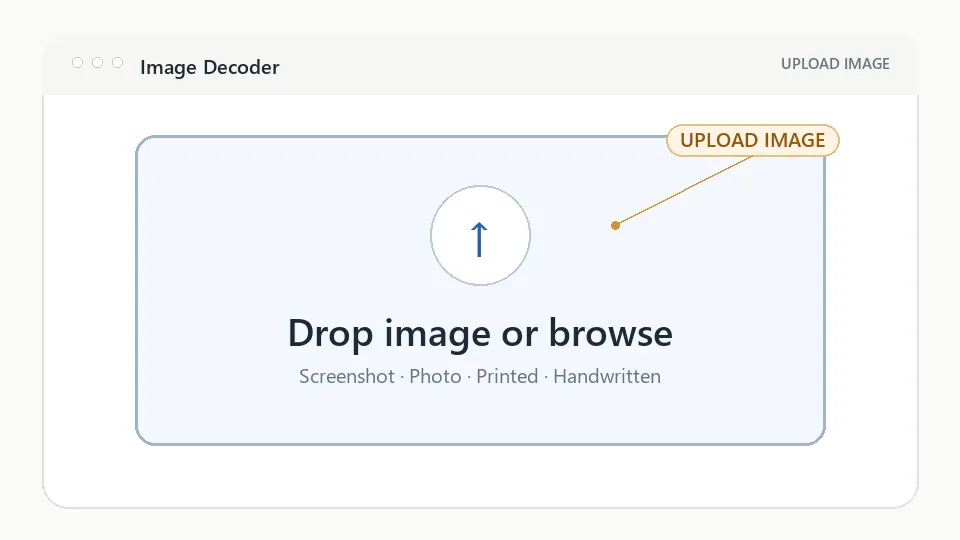
Uploading a Morse code image into the Image Morse Decoder interface
Figure 1. Upload imageChoose a screenshot, photograph, printed signal, or handwritten Morse image from your device.
Step 1

Upload image

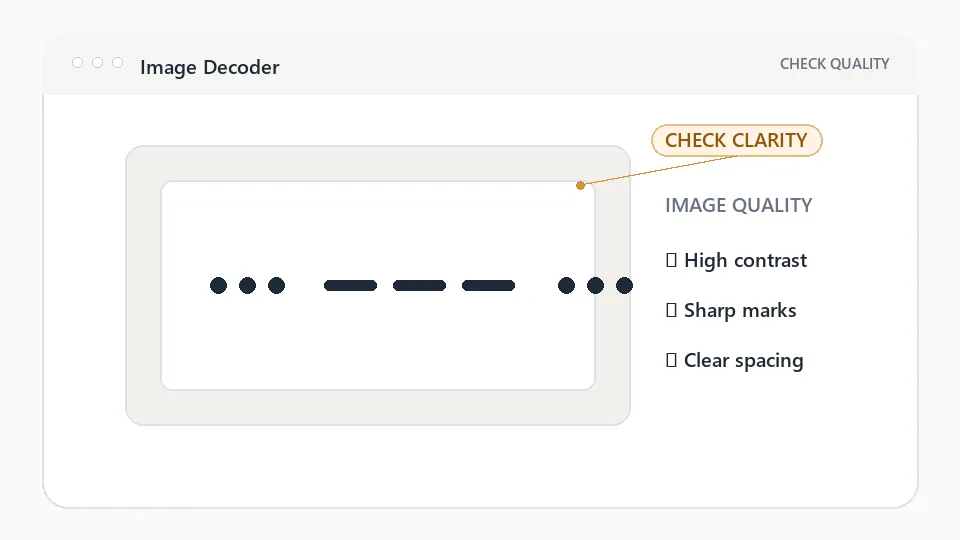
Image Morse decoder preview showing high-contrast Morse code image quality checks
Figure 2. Check clarityConfirm that dots, dashes, and spaces are sharp, straight, and easy to distinguish.
Step 2

Check clarity

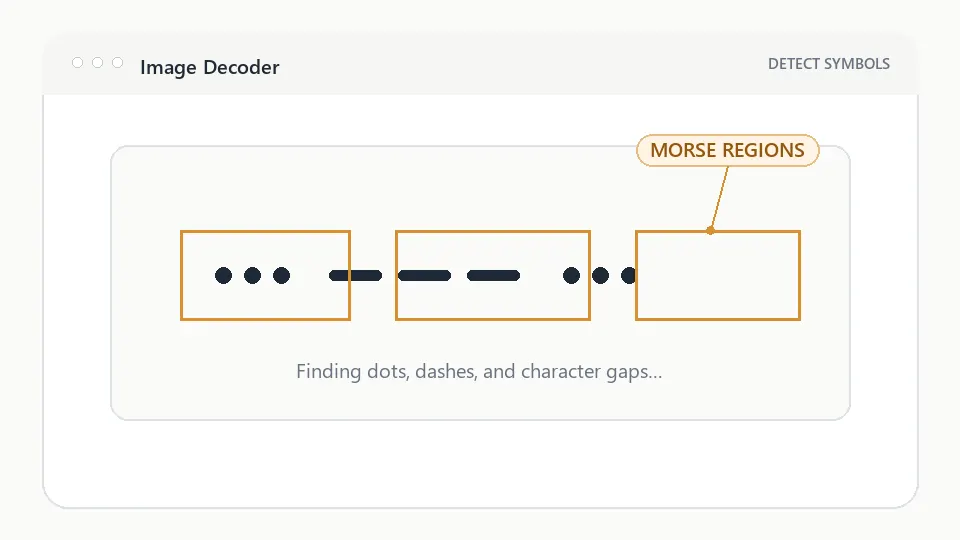
Image Morse Decoder detecting dots and dashes from an uploaded image
Figure 3. Detect Morse patternVerified samples demonstrate how a recognition workflow can identify likely Morse regions and group marks into characters. Arbitrary-upload recognition remains beta.
Step 3

Detect Morse pattern

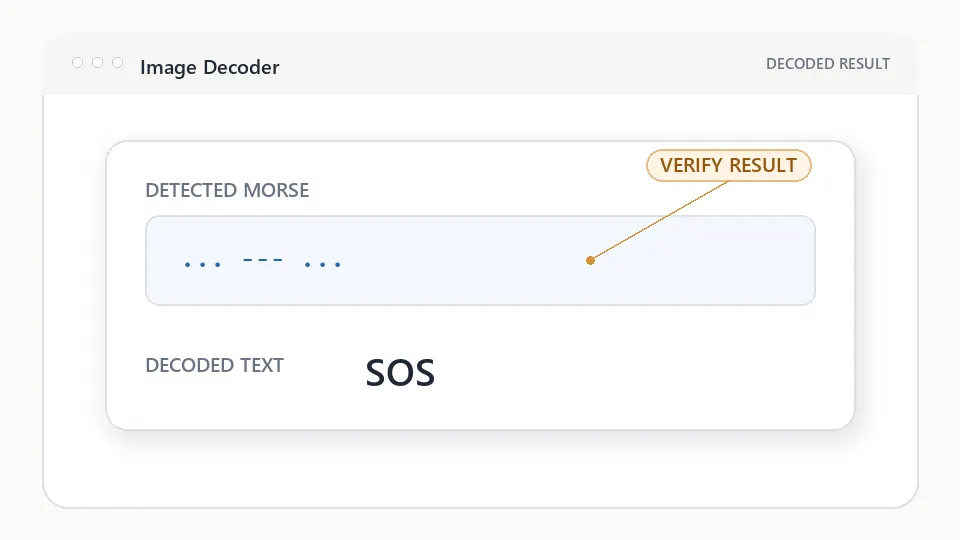
Image Morse decoder result showing detected SOS pattern and decoded text
Figure 4. View resultWhen a result is present, compare the detected Morse pattern with the source before copying or sharing it. An empty result means the upload was not decoded.
Step 4

View result

Visual explanation

How an image becomes a Morse translation

The workspace keeps each transformation understandable while advanced controls remain optional.

  1. Image

    Upload a screenshot, photograph, printout, or handwriting.

  2. Detect Symbols

    Contrast and spacing reveal likely dots, dashes, and gaps.

  3. Recognize Pattern

    Detected marks are grouped into characters and words.

  4. Decoded Text

    Review the recognized Morse and readable result together.

DECODER REFERENCE

Understand the result, not only the output

Why use the Image Morse Decoder?

Use the image workspace to preview screenshots, photographs, printed signals, and clear handwriting. Automatic extraction from arbitrary uploads is still beta, so the visible source and detected Morse must be compared before use.

Supported images

Works with:

  • Clear screenshots with visible dots, dashes, and spacing
  • Straight photographs of printed Morse
  • High-contrast handwriting with separated marks
  • PNG, JPEG, and WebP files supported by the browser

Best results

  1. Clear image — crop away unrelated objects and avoid blur.
  2. High contrast — keep dots and dashes distinct from the background.
  3. Good lighting — photograph paper straight-on without glare.
  4. Visible spacing — leave clear gaps between characters and words.
Which Morse decoder should I use?

Choose the page that matches the Morse source you already have.

I have textText Morse Translator
I have an imageImage Morse Decoder
I have audioAudio Morse Decoder

IMAGE DECODER QUESTIONS

Image Morse Decoder, explained

Can I decode Morse from an image?

You can upload and preview a screenshot, photograph, or scan. Verified samples demonstrate the workflow, but automatic decoding of arbitrary images is still beta and may return no result.

Can handwritten Morse be recognized?

Clear spacing and high contrast make handwriting easier to inspect, but arbitrary handwritten uploads are not guaranteed to be recognized in the current beta.

Can I review the detected Morse before using the text?

Yes. When recognition produces a result, the Morse pattern and readable text appear together. If those fields remain empty, the image was received but not decoded.